5 On-Page SEO Elements Every Beginner Should Check First
March 23, 2026
SEO can feel overwhelming with its endless list of ranking factors, technical requirements, and best practices. But the fundamentals are surprisingly simple. These five on-page elements have the biggest impact on how search engines understand and rank your pages — and they are all within your direct control.
1. Title Tag
The title tag is the single most important on-page SEO element. It appears in search results as the clickable headline and in the browser tab. Search engines use it to understand what your page is about.
What to check:
- Length: 30 to 60 characters. Too short wastes an opportunity to include keywords. Too long gets truncated in search results
- Primary keyword: Include your target keyword, ideally near the beginning
- Uniqueness: Every page should have a distinct title. Duplicate titles confuse search engines
Good example:
How to Track Subscription Spending | SubWatch
Bad example:
Home or Page 1 or a title that exceeds 70 characters and gets cut off in search results
2. Meta Description
The meta description appears below the title in search results. While it does not directly affect rankings, a compelling description increases click-through rate — which does affect rankings indirectly.
What to check:
- Length: 120 to 160 characters. Enough to describe the page content and include a call to action
- Relevance: Accurately summarize what the page offers. Misleading descriptions lead to high bounce rates
- Uniqueness: Avoid duplicating meta descriptions across pages
Tip: If you do not write a meta description, Google will auto-generate one from your page content. This is often less compelling than a hand-written description. Always write your own.
3. Heading Structure (H1, H2, H3)
Headings create a content hierarchy that helps both users and search engines understand your page structure.
What to check:
- One H1 per page: The H1 should be your main topic, ideally matching or closely related to your title tag
- Logical hierarchy: H2s for main sections, H3s for subsections. Do not skip levels (H1 → H3 without H2)
- Keywords in headings: Include relevant keywords naturally, but avoid keyword stuffing
A well-structured page with clear headings is easier to scan, keeps visitors on the page longer, and signals to search engines what each section covers.
4. Image Alt Text
Alt text describes the content of an image for screen readers and search engines. Missing alt text is one of the most common SEO issues — and one of the easiest to fix.
What to check:
- All images have alt text: Every
<img>tag should include analtattribute - Descriptive content: Describe what the image shows, not just “image” or “photo”
- Keyword relevance: Include relevant keywords where natural, but prioritize accuracy
Good example:
alt="Dashboard showing monthly subscription costs broken down by category"
Bad example:
alt="image1" or alt="" or no alt attribute at all
5. Internal Links
Internal links connect your pages to each other, helping search engines discover and understand the relationship between your content. They also help visitors navigate your site.
What to check:
- Key pages are linked: Your most important pages should be reachable from multiple other pages
- Descriptive anchor text: Use text that describes the linked page, not generic “click here”
- No broken links: Links to pages that no longer exist (404 errors) waste crawl budget and frustrate visitors
How to Check These Elements Quickly
Manually inspecting these five elements by viewing source code works, but it is tedious for multiple pages. Browser extensions can automate this check.
SEO Page Optimizer analyzes all five elements with one click. It gives you a score, flags issues by severity (High, Medium, Low), and provides specific fix suggestions for each problem found.
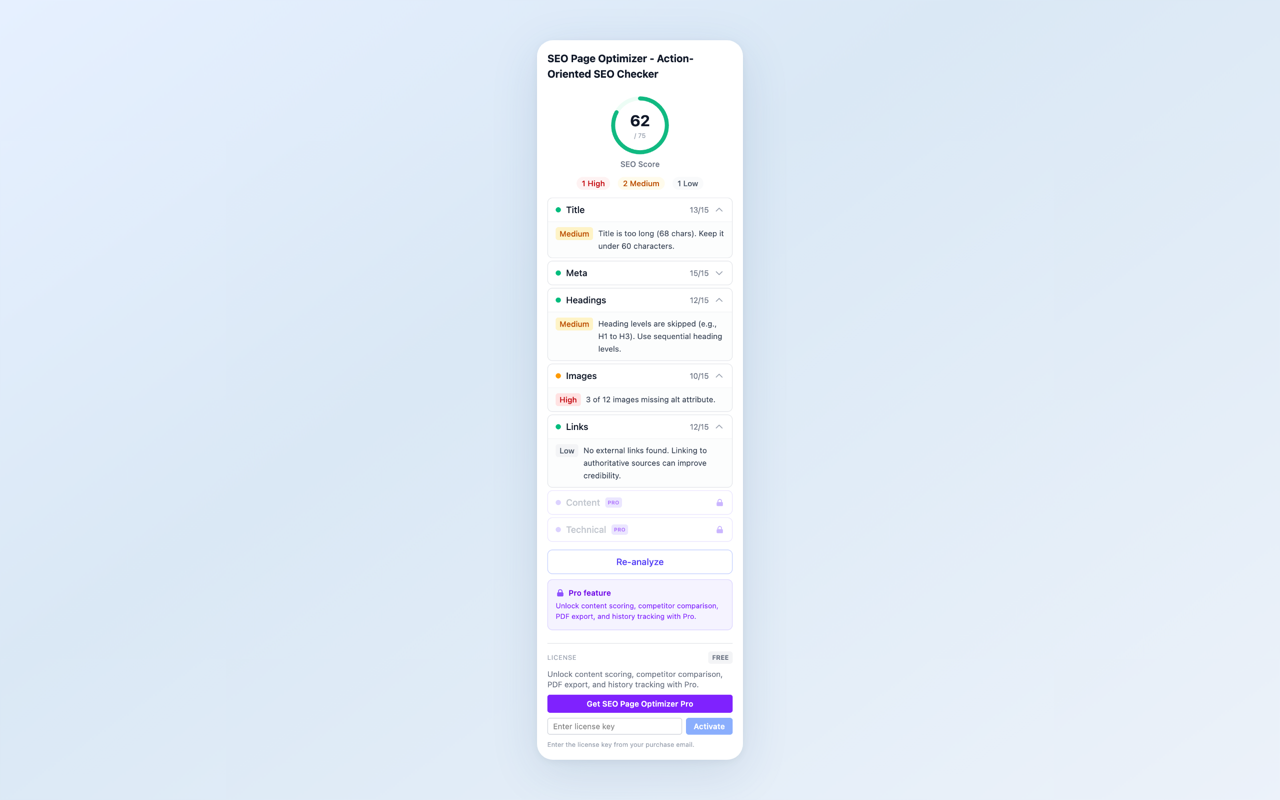
One-click analysis — all five elements checked with severity indicators
Quick Reference Checklist
| Element | What to Check | Ideal Range |
|---|---|---|
| Title tag | Length, keyword, uniqueness | 30-60 characters |
| Meta description | Length, relevance, uniqueness | 120-160 characters |
| Headings | One H1, logical hierarchy | No skipped levels |
| Image alt text | Present, descriptive | All images covered |
| Internal links | Reachable, descriptive anchors | No broken links |
Start with these five elements. They cover the fundamentals that every page needs, and fixing issues here often produces noticeable improvements in search visibility.
Want to check all five elements on any page in seconds? SEO Page Optimizer gives you a score, prioritized issues, and actionable fix suggestions with one click — no account required.
Feedback is welcome — leave a review on the Chrome Web Store page or reach out at [email protected].