What Is Environment Separation? Why Dev, Staging, and Production Need Visual Boundaries
April 30, 2026
A developer runs a database migration. It completes in seconds. Then the Slack messages start: “Why is the production database showing test data?” The developer was in the wrong environment. This scenario — someone performing the right action in the wrong place — is the most common and most preventable category of cloud incidents. Environment separation is the practice that prevents it.
The Three Environments
Most software teams work with at least three environments:
- Development (Dev) — Where developers write and test code. Breaking things here is expected and safe. No real users, no real data.
- Staging — A near-identical copy of production used for final testing. It mirrors production’s architecture but uses test data. The last checkpoint before code reaches real users.
- Production (Prod) — The live environment serving real users with real data. Mistakes here affect customers, revenue, and trust.
Some teams add more layers — QA environments, sandbox accounts, performance testing environments — but the dev/staging/production trio is the foundation.
Three Layers of Environment Separation
Effective environment separation is not a single practice. It is three distinct layers, each protecting against a different type of mistake.
Layer 1: Infrastructure Separation
The most fundamental layer. Each environment runs on a separate cloud account, project, or subscription:
- AWS: Separate AWS accounts per environment (managed through AWS Organizations)
- GCP: Separate projects per environment
- Azure: Separate subscriptions or resource groups per environment
This ensures that a misconfigured deploy script cannot accidentally target production resources when running in the dev context. Infrastructure separation is the industry standard, and most teams implement it early.
Layer 2: Access Separation
Even with separate accounts, people need access to multiple environments. Access separation controls who can do what in each environment:
- Developers get full access to dev, read-only access to staging, and no direct access to production
- Only deployment pipelines (CI/CD) can push changes to production
- Production database access requires approval and audit logging
IAM policies, role-based access control (RBAC), and least-privilege principles enforce this layer. It prevents unauthorized changes but does not prevent authorized users from making mistakes in the wrong environment.
Layer 3: Visual Separation
This is the layer most teams skip. Infrastructure and access controls are technical guardrails, but they do not help the human sitting in front of the cloud console. Visual separation makes the current environment immediately obvious through visual cues:
- Color-coded console headers (red for production, green for dev)
- Environment labels in the browser tab title
- Distinct favicons per environment
- Banner warnings on production pages
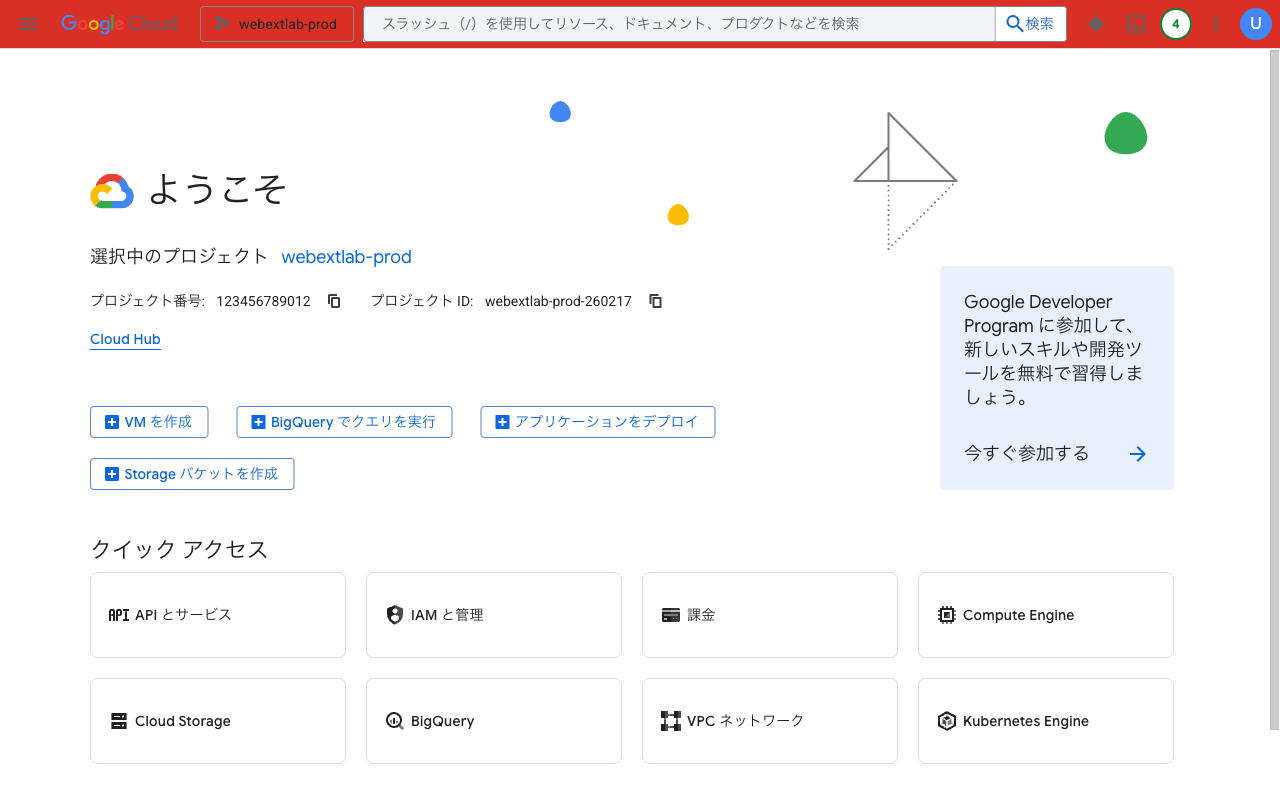
A red header on GCP Console makes the production environment unmistakable
Visual separation works because humans process color faster than text. A red header triggers a “be careful” response before you read the account name in the corner. It turns environment awareness from a conscious effort into a reflexive glance.
Why Visual Separation Is the Most Overlooked Layer
Infrastructure separation is automated with IaC tools. Access separation is enforced by IAM policies. Both are set-and-forget configurations. Visual separation, by contrast, requires a deliberate decision that does not show up in security audits or compliance checklists.
The result: teams invest heavily in infrastructure and access controls, then leave their cloud consoles looking identical across all environments. AWS Console looks the same whether you are in a sandbox account or the production account that serves 10 million users. GCP Console uses the same white header whether the project is a test playground or a revenue-critical service.
This gap explains why wrong-environment incidents keep happening even at organizations with strong security posture. The technical controls are in place, but the human interface offers no visual warning.
How to Add Visual Boundaries
Quick wins for visual environment separation:
- Browser extensions — Tools like Cloud Env Marker automatically detect AWS/GCP/Azure accounts and add colored header bars. Red for prod, green for dev, no configuration needed beyond Quick Presets.
- AWS native header colors — AWS now supports tinting the console header by account (Settings > Console appearance). AWS-only, subtle, but zero-install.
- Custom CSS with Stylus — For teams that want full control, inject custom CSS rules per cloud console domain. Requires maintenance when console HTML changes.
- Browser profiles — Use separate Chrome profiles for each environment. Heavy-handed but provides full visual and session isolation.
The best approach depends on your cloud footprint. If you work across AWS, GCP, and Azure, a multi-cloud extension gives you consistent visual cues across all three. If you are AWS-only, the native feature may be sufficient.
The Complete Picture
Environment separation is not one thing — it is three layers working together:
- Infrastructure keeps resources physically apart
- Access controls who can do what
- Visual helps humans know where they are at a glance
The first two layers prevent unauthorized actions. The third prevents authorized people from making honest mistakes. All three are necessary. If your production console looks exactly like your dev console, you have a gap in layer three — and it is the easiest one to close.
Add visual environment separation in 30 seconds: Cloud Env Marker automatically detects AWS, GCP & Azure accounts and applies color-coded headers. Quick Presets make production red and dev green with one click.
Found this guide helpful? Leave a review on the Chrome Web Store — it helps other engineers find the tool.
Questions or feedback? Reach out at [email protected].