How to Check Technical SEO Issues Without Touching Code
March 26, 2026
Technical SEO sounds like something only developers need to worry about. Terms like "canonical URL," "JSON-LD," and "Open Graph" can feel intimidating if you have never opened a code editor. But here is the thing: these elements directly affect whether your pages show up in search results, how they appear when shared on social media, and whether Google considers them mobile-friendly. The good news is you do not need to read a single line of HTML to check them.
Why Technical SEO Matters for Non-Developers
On-page SEO — titles, meta descriptions, headings — gets most of the attention. But underneath that visible layer, technical SEO elements act as instructions for search engines and social platforms. When they are missing or misconfigured, problems happen silently:
- Your page gets indexed under the wrong URL, splitting your ranking power across duplicates.
- A shared link on LinkedIn shows a broken preview with no image or a wrong title.
- Google skips your page for rich results because it cannot find structured data.
- Your site fails mobile usability checks, which hurts rankings since Google uses mobile-first indexing.
These are not edge cases. They are common issues on blogs, small business sites, and even well-maintained content platforms. And you can catch all of them without writing code.
6 Technical SEO Elements You Can Check Without Code
1. Canonical URL — Preventing Duplicate Content
What it does: A canonical URL tells search engines, “This is the official version of this page.” Without it, Google may index multiple versions of the same content (with and without www, with tracking parameters, etc.) and split your ranking signals across them.
What goes wrong without it:
- Your page competes with itself in search results
- Link equity gets diluted across duplicate URLs
- Google may choose the wrong version as the primary one
What to look for: Every page should have a canonical URL that points to itself (or to the preferred version if duplicates exist intentionally). If it is missing entirely, search engines are guessing which URL to prioritize.
2. Open Graph Tags — Fixing Broken Social Previews
What it does: Open Graph (OG) tags control how your page looks when someone shares the link on Facebook, LinkedIn, Slack, or other platforms. The four essential tags are og:title, og:type, og:image, and og:url.
What goes wrong without it:
- Shared links show a generic title or no image at all
- The preview pulls random text from the page instead of your intended description
- Click-through rates on social shares drop significantly
What to look for: At minimum, your page needs og:title, og:image, and og:url. The image should be the right dimensions (1200×630 pixels is the standard) and actually load when accessed.
3. Twitter Card Tags — Making Posts Stand Out
What it does: Twitter (X) Card tags work similarly to Open Graph but are specific to the Twitter platform. They determine whether your link shows up as a small card or a large image card in the timeline.
What goes wrong without it:
- Your tweets with links look plain — just a URL with no preview
- You miss the opportunity for a large, eye-catching image card
- Engagement on link tweets drops compared to competitors who have cards configured
What to look for: A twitter:card tag set to summary_large_image gives you the best visibility. Combined with twitter:title and twitter:image, your links will stand out in feeds.
4. JSON-LD Structured Data — Unlocking Rich Results
What it does: JSON-LD (JavaScript Object Notation for Linked Data) is a format that tells Google exactly what your content is — an article, a product, a FAQ, a recipe, or a local business. This is what powers those enhanced search results with star ratings, FAQ dropdowns, and recipe cards.
What goes wrong without it:
- Your search results look plain while competitors show star ratings and rich snippets
- You miss opportunities for FAQ-style dropdowns that take up more space in results
- AI-powered search tools like Google AI Overviews have less context about your content
What to look for: Blog posts should ideally have Article schema. Business sites benefit from Organization or LocalBusiness schema. If you see no structured data at all, you are leaving visibility on the table.
5. Robots Meta Tag — Ensuring Pages Get Indexed
What it does: The robots meta tag tells search engines whether they are allowed to index a page and follow its links. It is a simple instruction, but a misconfigured one can make your page completely invisible to Google.
What goes wrong with it:
- A
noindextag accidentally left on a production page means Google will never show it in search results - A
nofollowtag prevents search engines from discovering linked pages - These mistakes are invisible to visitors — your page looks fine in the browser while being hidden from search
What to look for: Most pages should either have no robots tag (defaults to allowing indexing) or explicitly say index, follow. If you see noindex on a page that should be in search results, that is a critical issue.
6. Viewport Meta Tag — Confirming Mobile Readiness
What it does: The viewport meta tag tells mobile browsers how to scale the page. Without it, your page may display at desktop width on a phone, forcing users to pinch and zoom.
What goes wrong without it:
- Google’s mobile-first indexing may penalize your page
- Mobile users see a tiny, unreadable version of your site
- Core Web Vitals scores suffer, which is a ranking factor
What to look for: The viewport tag should be present and set to width=device-width, initial-scale=1. This is standard in modern web development, but older pages or custom-built sites sometimes miss it.
How to Check All 6 at Once
You could inspect each of these elements manually by right-clicking “View Page Source” and searching through HTML. But that defeats the purpose if you are trying to avoid code.
A faster approach is using a browser extension that reads the page and reports what is present, what is missing, and what needs fixing. SEO Page Optimizer, for example, includes a Technical SEO category in its Pro plan that checks all six elements above in one click — canonical URL, Open Graph, Twitter Cards, JSON-LD, robots meta, and viewport — and tells you exactly what is missing or misconfigured.
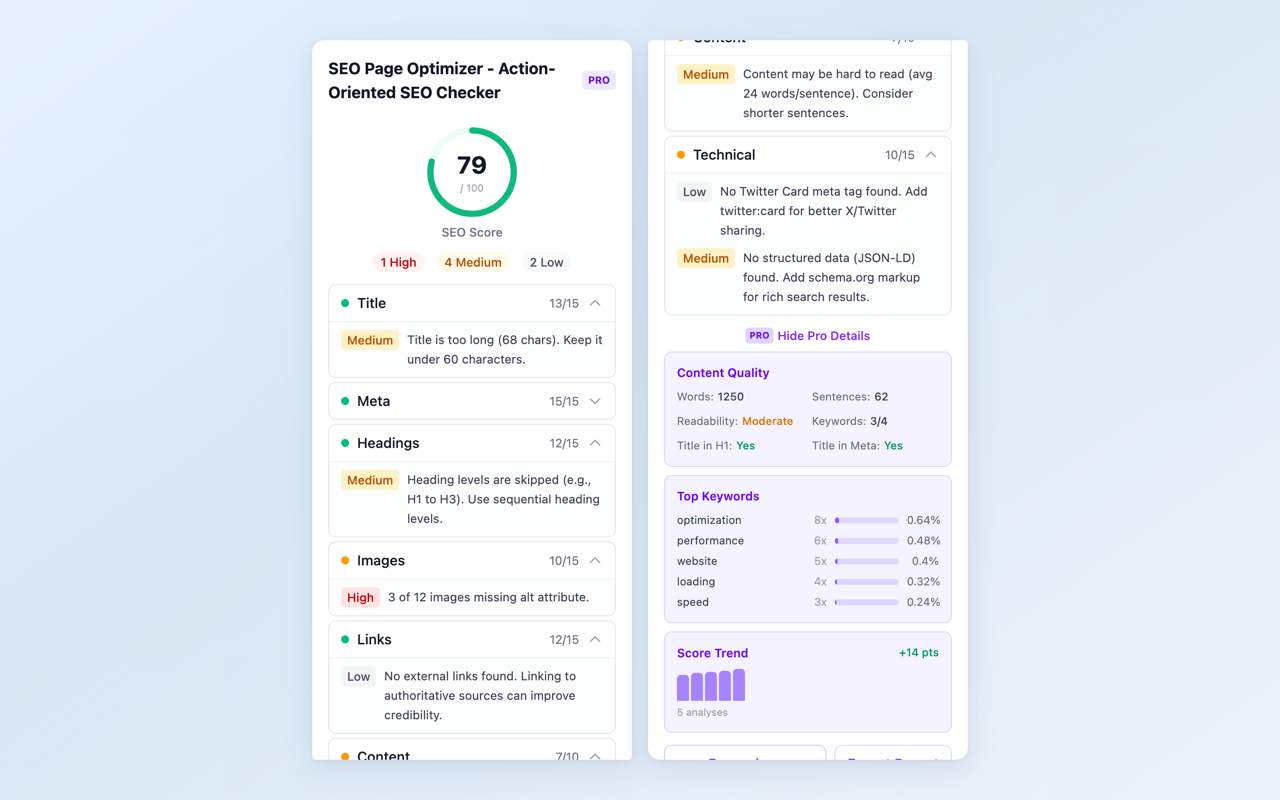
Technical SEO results displayed alongside on-page analysis — no source code reading required.
The key advantage of checking in-browser is context: you see the results for the exact page you are looking at, not a batch report for your entire site. This is especially useful when you publish a new blog post and want to verify everything is set up correctly before promoting it.
A Quick Technical SEO Checklist
Use this as a reference when reviewing any page:
| Element | What to check | Priority |
|---|---|---|
| Canonical URL | Present and points to the correct URL | High |
| OG Tags | og:title, og:image, og:url all present | High |
| Twitter Card | twitter:card set to summary_large_image | Medium |
| JSON-LD | Relevant schema type present (Article, Product, etc.) | Medium |
| Robots Meta | No accidental noindex on public pages | High |
| Viewport | width=device-width, initial-scale=1 present | High |
Conclusion
Technical SEO is not reserved for developers. The six elements covered here — canonical URLs, Open Graph tags, Twitter Cards, structured data, robots meta, and viewport — are foundational checks that any content creator, blogger, or business owner can verify. The difference between a page that ranks well and one that struggles is often not the content itself, but these invisible technical details working correctly behind the scenes.
Start with the high-priority items: canonical URL, robots meta, and viewport. Then move to social tags and structured data. Once you make checking these a habit, you will catch issues before they cost you traffic.
Check your page’s technical SEO now
Install SEO Page Optimizer — free on-page analysis with one click. Upgrade to Pro for technical SEO checks, competitor comparison, and PDF reports.
Found this guide helpful? Leave a review on the Chrome Web Store — it helps other users discover the extension.
Questions or feedback? Reach out at [email protected]