How Much Are You Spending on Subscriptions? How to Find Hidden Recurring Charges
March 25, 2026
The average person spends more on subscriptions than they think. A streaming service here, a cloud storage plan there, a SaaS tool you signed up for months ago — each charge is small enough to ignore individually, but together they can add up to hundreds of dollars per month. Here is how to find every recurring charge and get a clear picture of your subscription spending.
Why Subscriptions Are Hard to Track
Subscriptions are designed to be forgettable. Auto-renewal means you never have to make an active decision to keep paying. Charges are spread across different billing dates, payment methods, and currencies, making it difficult to see the total.
Common places where subscriptions hide:
- Credit card statements — charges from services you forgot about, sometimes under unfamiliar merchant names
- App store subscriptions — iOS and Android apps with recurring in-app purchases
- Annual billing — services that charge once a year are easy to forget between billing cycles
- Free trials — trials that converted to paid subscriptions without a reminder
Step 1: Audit Your Payment Sources
Start by checking every place where subscriptions could be charged:
- Bank and credit card statements — search for recurring charges over the past 3 months. Look for amounts that repeat on similar dates
- Apple App Store / Google Play — check Settings → Subscriptions for active app subscriptions
- PayPal — check Settings → Payments → Manage automatic payments
- Email inbox — search for “receipt,” “invoice,” “subscription,” or “renewal” to find billing emails
Tip: Create a dedicated email label or folder for subscription receipts. Set up a filter to automatically sort billing emails so they are easy to find during future audits.
Step 2: List Everything in One Place
Once you have identified your subscriptions, record them with these details:
- Service name
- Monthly or annual cost (convert annual to monthly for comparison)
- Billing cycle and next renewal date
- Payment method
- Category (streaming, software, cloud, fitness, etc.)
A spreadsheet works, but it requires manual upkeep. Dedicated tools make this easier by calculating totals and showing upcoming renewals automatically.
SubWatch is a Chrome extension that provides a dashboard for exactly this — monthly and yearly totals, a category breakdown chart, and an upcoming renewal list. All data stays in your browser’s local storage, so you do not need to connect a bank account or create an account.
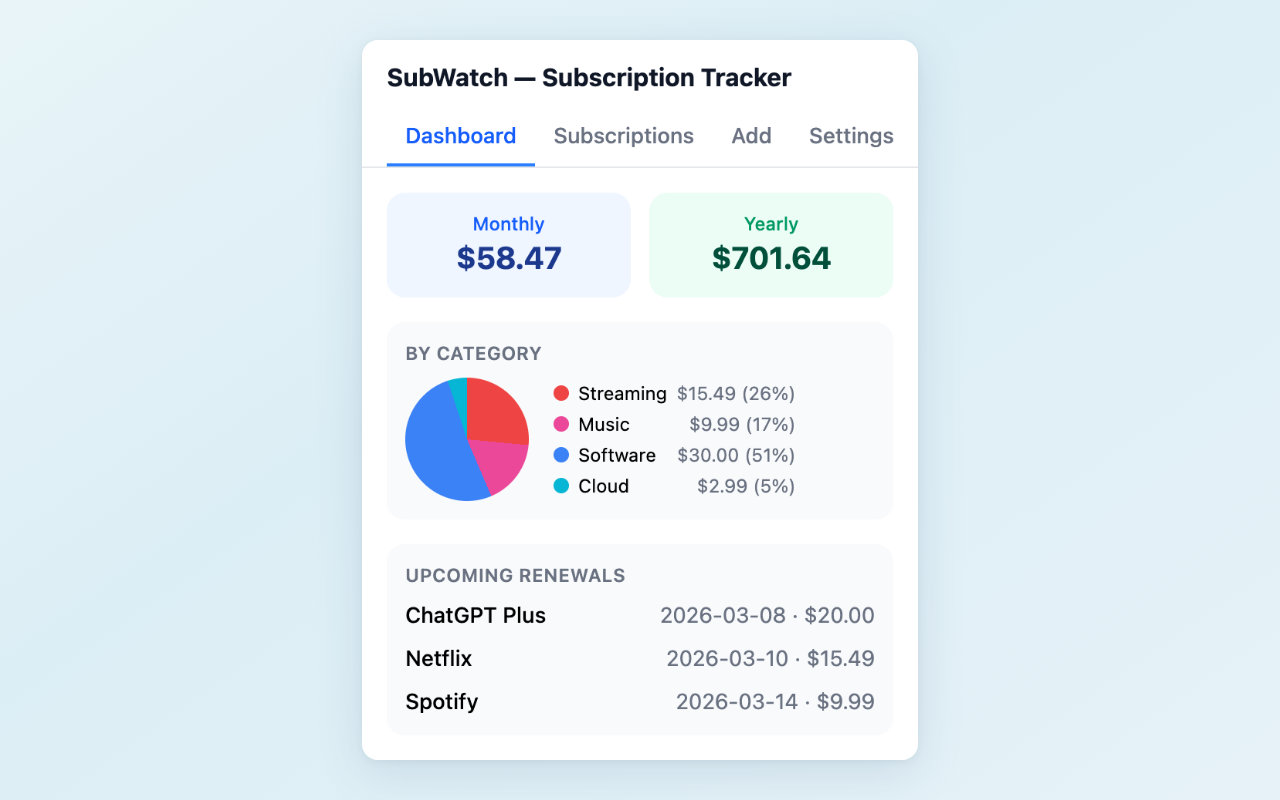
Dashboard — see your total spending and category breakdown at a glance
Step 3: Evaluate Each Subscription
With everything listed, ask three questions about each subscription:
- When did I last use this? If it has been more than a month, consider canceling
- Is there a free alternative? Many paid tools have free tiers that cover basic needs
- Am I on the right plan? You might be paying for a premium tier when a basic plan would suffice
Step 4: Set Up Renewal Reminders
The most common reason people keep paying for unused subscriptions is that they forget the renewal date. Setting reminders 2 to 3 days before each renewal gives you time to decide whether to continue.
Calendar reminders work, but they require manual setup for each subscription. Tools like SubWatch can automate this — the Pro version sends browser notifications before each renewal date.
Step 5: Schedule Regular Audits
A one-time audit helps, but subscriptions accumulate again over time. Schedule a quarterly review (set a calendar reminder for every 3 months) to:
- Check for new subscriptions you may have added
- Re-evaluate services you kept during the last audit
- Update costs if prices have changed
Want a quick overview of your subscription spending? SubWatch shows monthly totals, category breakdowns, and upcoming renewals in your browser toolbar — no bank account connection required.
Feedback is welcome — leave a review on the Chrome Web Store page or reach out at [email protected].