What Are Browser Workspaces? How Saving Your Tab Layout Reduces Context Switching
April 23, 2026
You have 30 tabs open for Project A. A Slack message pulls you into Project B. You open 15 new tabs, and suddenly your tab bar is an unreadable mess of favicons. When you return to Project A, half your tabs are buried, your mental model is gone, and you spend five minutes finding where you left off. Browser workspaces solve this by letting you save, hide, and restore entire tab layouts with a single action.
The Real Cost of Switching Contexts
Context switching in a browser is not just an annoyance — it has a measurable productivity cost. Research from the University of California, Irvine found that it takes an average of 23 minutes to fully regain focus after a task interruption. A Microsoft study showed that knowledge workers switch between applications and tabs over 1,100 times per day.
The problem is not the number of tabs. It is the mixing of unrelated contexts in a single view. When Project A tabs sit next to Project B tabs, your brain spends energy filtering out irrelevant information. This is called cognitive load — the mental effort required to hold and manage information in working memory.
Browser workspaces reduce this load by isolating contexts. Instead of one flat tab bar containing everything, you get separate views that you switch between cleanly.
What Browser Workspaces Actually Do
A browser workspace is a saved snapshot of your tab layout — which tabs are open, how they are grouped, and in what order. When you switch to a different workspace, the current tabs disappear and the new set appears. When you switch back, everything is exactly where you left it.
This is different from bookmarks, which save URLs but not context. A workspace preserves your working state: the specific combination of tabs you had open for a specific task, arranged in the way that made sense while you were doing it.
Think of it like desks in an office. You would not pile every project on a single desk. You would use separate desks (or at least separate drawers), and move between them as needed.
Three Approaches to Browser Workspaces
1. Built-In Browser Workspaces
Some browsers ship workspaces as a core feature:
- Vivaldi offers Workspaces that let you group all windows and tabs into named sets. Switch between them from the tab bar, and only the active workspace’s tabs are visible.
- Opera provides a similar Workspaces feature accessible from the sidebar. Each workspace acts as an independent browsing context.
- Arc (now part of The Browser Company) introduced Spaces, which separate tabs into distinct visual contexts with different sidebar configurations.
Strengths: Deep integration, no extensions needed, fast switching. Limitation: Requires switching to a different browser. If your workflow depends on Chrome-specific extensions or DevTools, these may not be options.
2. Chrome Profiles
Chrome lets you create multiple profiles, each with its own set of tabs, bookmarks, extensions, and login sessions. This is a heavy-handed workspace solution — it fully isolates browsing contexts.
Strengths: Complete isolation, separate login sessions, built into Chrome. Limitation: Switching profiles opens a new browser window. You cannot quickly flip between profiles the way you switch workspaces. Managing many profiles becomes cumbersome, and each profile consumes its own set of system resources.
3. Tab Group Extensions
Chrome’s native Tab Groups let you organize tabs into named, color-coded clusters. Extensions build on top of this by adding the missing piece: persistence. You can save your current tab group arrangement as a workspace and restore it later.
TabFlow takes this approach — it works with Chrome’s native Tab Groups rather than replacing them. You define domain rules (e.g., “github.com” goes into the blue Dev group), and TabFlow automatically groups matching tabs. When you save that arrangement as a workspace, you can restore the entire layout with one click, even after closing Chrome.
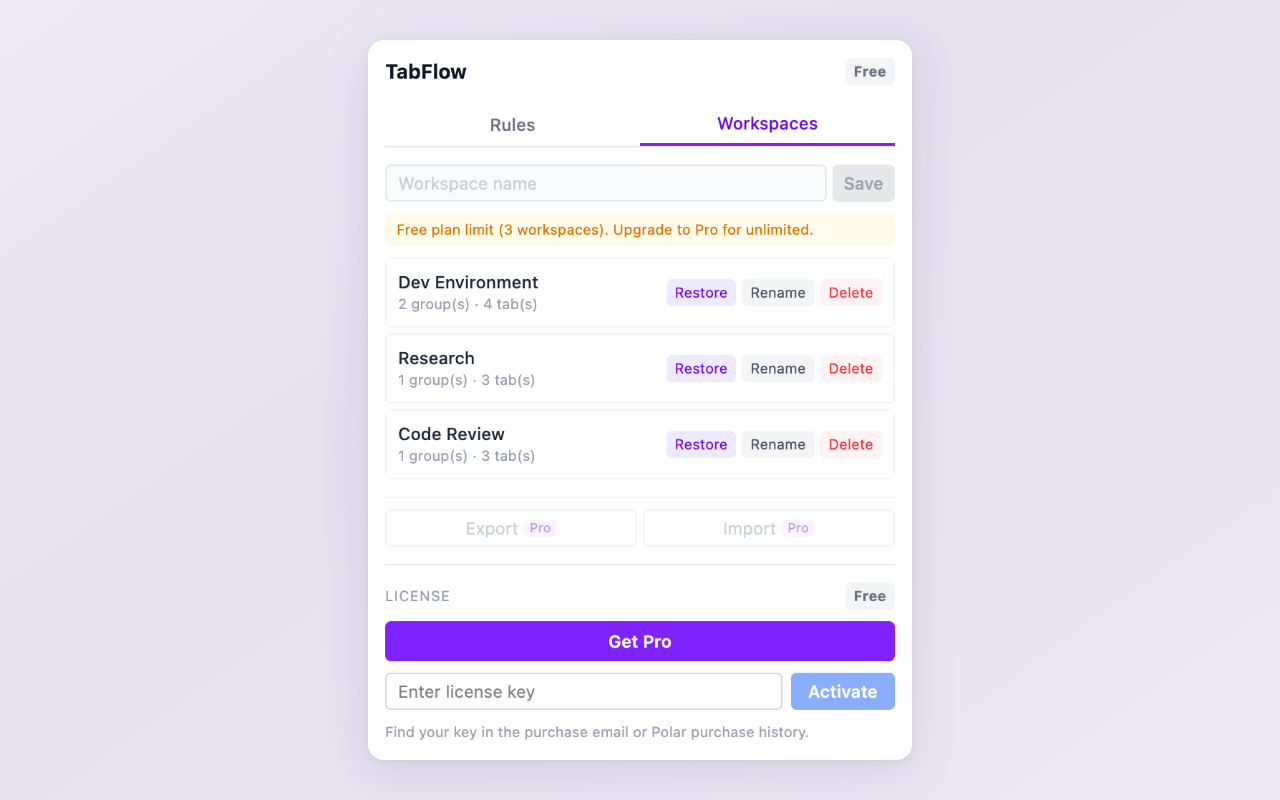
Saved workspaces in TabFlow — restore an entire tab group layout with one click
Strengths: Stays within Chrome, works with native Tab Groups, no learning curve. Limitation: Less isolation than separate profiles — login sessions are shared across workspaces.
How Workspaces Change Your Daily Workflow
Once you start using workspaces, three things change:
-
You stop hoarding tabs. When you know you can restore a tab layout, closing tabs stops feeling risky. You save the workspace, close everything, and open it again tomorrow.
-
You switch projects faster. Instead of scrolling through 40 tabs to find the right cluster, you switch workspaces in one click. The context switch takes seconds, not minutes.
-
You think more clearly. With only the relevant tabs visible, your brain stops filtering noise. The tab bar becomes a focused tool rather than a source of anxiety.
Which Approach Fits You?
- You use Vivaldi, Opera, or Arc: Use the built-in workspaces. They are fast and deeply integrated.
- You need separate logins for work and personal browsing: Chrome Profiles give you full isolation.
- You use Chrome and want lightweight workspace switching: A tab group extension keeps you in Chrome with minimal setup.
The concept is the same regardless of the tool: separate your contexts, save your state, and switch cleanly. The 23 minutes you lose to context switching are 23 minutes you get back every time you switch workspaces instead of hunting through a crowded tab bar.
Try workspace management in Chrome: TabFlow auto-groups tabs by domain and lets you save/restore your tab group layout as a workspace. Free to use, with unlimited workspaces in Pro.
Found this explainer helpful? Leave a review on the Chrome Web Store — it helps other users find the tool.
Questions or feedback? Reach out at [email protected].